Total Store Solution
Introducing the Total Store Solution from Summit Retail Technology, Inc. In today’s highly competitive retail industry, merchants require advanced and easy to use technology in order to effectively manage a store and to remain competitive for consumers’ dollars.
The Total Store Solution is a complete software and hardware solution for the modern retail store. Unlike competing systems that consist of crudely assembled software components, the Total Store Solution is a well-designed and tightly integrated suite of software modules that reliably and consistently manage the complete store operation. The Total Store Solution is well suited both to independently owned retail stores and to large chains comprised of hundreds of store locations. If you have a chain of stores, we have a suite of Central Office management applications which enable you to manage and monitor all of your stores from one location.
The biggest feature of the Total Store Solution is that it can be Custom Configured for your retail needs. No two retailers are alike, and we can quickly configure a Customized System that will meet your exact needs. We've been doing Point of Sale and Inventory Systems since 1998, and we have developed many configurations for a variety of different industries.
Point of Sale
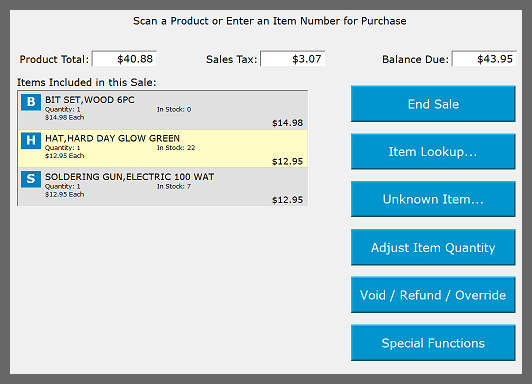
The Total Store Solution includes a powerful Touch Screen Cash Register system. The register is extremely easy for new cashiers to learn to use, and it is very efficient for experienced cashiers.
Each screen in the system is clearly laid out and extremely easy to use. Unlike competing systems which are cluttered with dozens of tiny touch screen buttons, each screen in the Total Store Solution Cash Register system displays a small number of easy-to-read buttons.
The Total Store Solution supports flexible promotional pricing. A variety of different promotional pricing schemes can be applied to individual items, families of items, items in a selected category, items from a selected vendor, or items in both a selected category and a selected vendor. Available pricing schemes include specified retail pricing, BOGO’s, percentage off and specified dollar amount off.
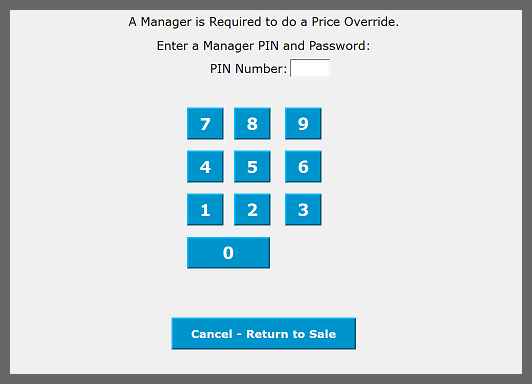
The Cash Register system can be configured so that privileged functions - such as Voids, Refunds and Price Overrides - require a Manager's PIN. This helps you avoid cashier mistakes - accidental or otherwise - that impact your profitability.
Pharmacy Point of Sale
Our first Point of Sale System was for a large chain of Drug Stores, and we are still doing systems for Pharmacies.
Our System has many features to properly run a Pharmacy, including:
- Interfaces with several Pharmacy Management Systems
- Call-Up of Other Prescriptions for the Customer
- Prescription Purchase History Lookup with Electronc Signatures
- FSA/HSA, EBT Cash and EBT Food/SNAP Card Processing
- Proper handling of products containing Pseudoephedrine
- Meticulous Inventory Tracking
- Automatic Ordering for OTC products
- Detailed Profitability Reports for prescription purchases
- Customer Accounts for pharmacies that offer these to individuals and/or institutions.
Cash Office
The Total Store Solution is quite unique in that it tracks every single action performed by each cashier. Armed with this wealth of information, the Cash Office module enables operators to closely monitor the performance of store employees.
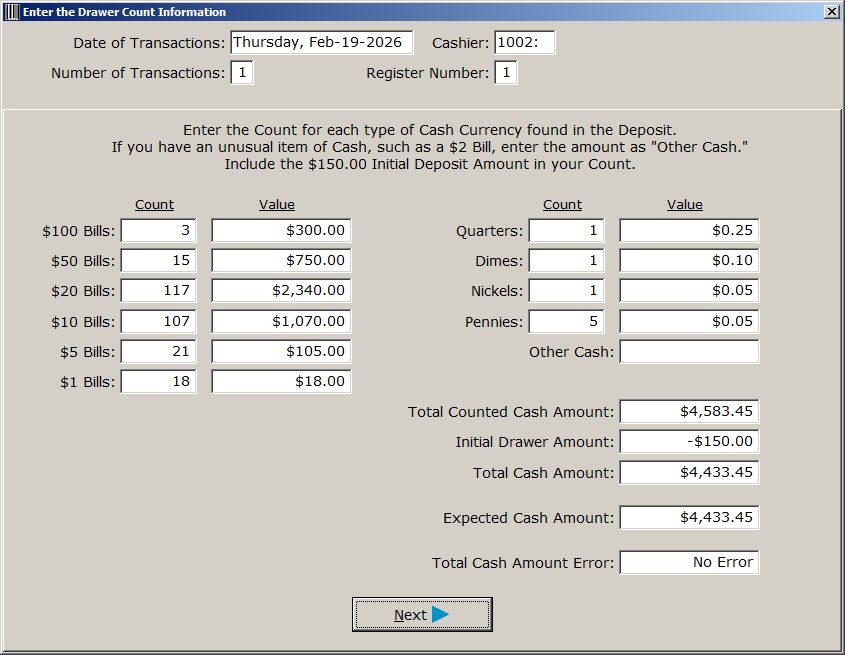
At the conclusion of each shift, the system knows the exact dollar amount of each tender that should be found in the cash register drawer. The system can be configured for either blind or nonblind balancing, depending upon the operat ional structure used in the store.
After all the drawers are counted and the bank deposit(s) are made at the end of the day, the Cash Office module produces a meaningful and useful Daily Sheet Report. This report concisely states exactly how the store performed during the business day, both in terms of sales and cashier performance. Additional reports help identify cash counting discrepancies for selected date periods. Reports also exist which identify cashiers who exhibit potentially fraudulent ac tivity.
Cashiers in the Total Store Solution have definable privileges in order to distinguish between "rookies" and trusted employees for limiting tasks such as voids, refunds, price overrides, and payouts.
You work hard and spend money to bring customers into your store and to encourage them to purchase your products. The Total Store Solution Cash Office system helps your store keep track of the money you’ve earned!
Item File Maintenance
One of the biggest tasks facing any retailer installing and supporting a point of sale system is the creation and maintenance of the store item file. A typical store will include several thousand items, each of which requires the
entry of accurate pricing information, product description and sales tax status information. In addition, each product requires assignment to an appropriate Category and Vendor in order to facilitate meaningful sales and item movement
reporting. As suppliers continue to ship new products and as market demands dictate price changes, ongoing work is required to make certain all items scan at the correct price at the cash registers.
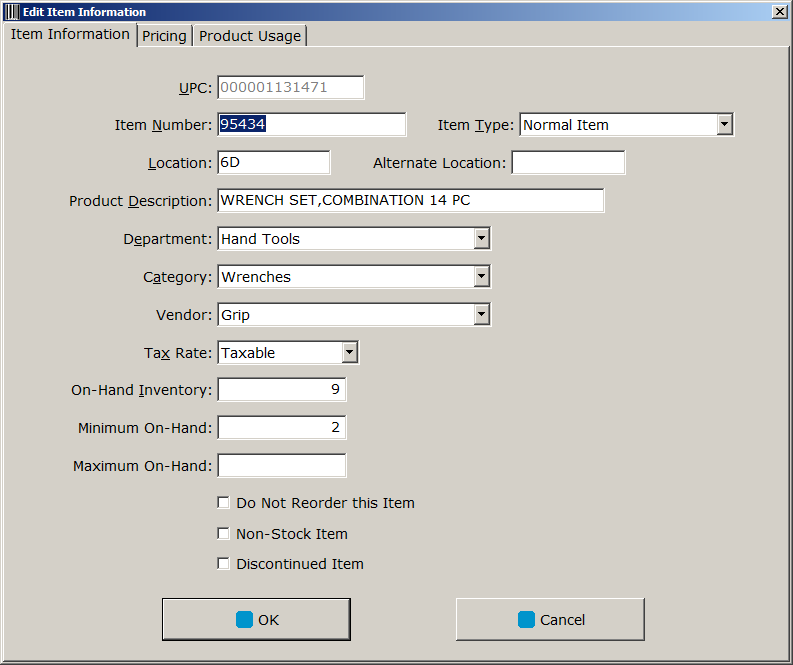
The Total Store Solution includes a very powerful and easy-to-use application for building and maintaining the store’s item file. As with any POS system, item entry screens are used to create new products in the system. One quick way to add new products to the system is a Clone function. As an example, let's say you sell screwdrivers in your store. You would start by entering all the information for one screwdriver, including the UPC Number, the Category, the Vendor, the Description, the Tax Status, the Cost and the Retail Price. Once the first screwdriver is entered, you can now Clone a new item. For the new item, most of the product information stays the same. Just change the UPC Number, the Description, the Cost and the Retail Price.
The Total Store Solution supports importing product data from a spreadsheet. If you have Vendors that supply their product information in spreadsheets, you can use the data to add new products into the system. You can also use a spreadsheet to update existing items. This is a great tool for keeping you cost information accurate.
The Total Store Solution supports Families of products. Families are ideal for driving the pricing of closely related products, such as shades of hair color and flavors of toothpaste. Rather than requiring individual item prices, families of products only require a single retail price for the entire family. This timesaving tool also enforces accuracy when setting retail prices for your store.
The Total Store Solution supports flexible promotional pricing. A variety of different promotional pricing schemes can be applied to individual items, families of items, items in a selected Category, items from a selected Vendor, or items in both a selected Category and a selected Vendor. Available pricing schemes include reduced retail pricing, BOGO’s, percentage off and specified dollar amount off.
Inventory Management
Running a successful retail business requires accurate management of your Perpetual Inventory. Knowing exactly what you have in stock, along with knowing how quickly each of your products sells, is the only way accurate and efficient automatic Product Ordering can take place.

Problems with Inventory can really hurt your business. If you don't have enough of a popular item, you will lose sales. If you have too much of a product that isn't very popular, you've wasted money on inventory that isn't bringing in revenue. Too much inventory also takes up space in your store, space that could be better used on more popular products.
The Total Store Solution includes a powerful hand-held terminal based inventory management system that is fully integrated with all modules of the system. The hand-held terminal is a real time high performance system, capable of updating all aspects of the perpetual inventory data system instantly. Using hand-held terminals, store employees are able to efficiently receive products from vendors into the store system.
The hand-held terminals are also used to spot-check inventory levels and to keep the Price Labels in the store completely accurate.
Tracking and controlling a store’s perpetual inventory levels is essential in today’s fiercely competitive retail environment. The Total Store Solution perpetual inventory management system puts the tools in your hands to accurately maintain perpetual inventory data with a minimum of effort.
Every time a product's on-hand quantity is adjusted, the changed is logged and saved. This includes when a product is:
- Received from a Supplier
- Returned to a Supplier
- Sold to a Customer
- Returned by a Customer
- Spot-Checked during routine Perpetual Updates
By accurately tracking your Perpetual Inventory levels and your Sales Movement amounts, the Total Store Solution makes it possible to Purchase Products from Vendors at quantity levels that keep you at good in-stock levels.
Chain Stores
The Total Store Solution really shines when it's used for a Chain of Stores. Using a proprietary Dual-Direction Database Replication system, Item Data is sent from the Central Office to each store, and inventory and item movement data is sent from each store back to the Central Office.
The chain's Item File and Promotions are maintained at the Central Office. Individual stores can have different product pricing and availability. Each store is part of a Sales Tax Region. Sales Tax Regions are used to deal with products that are taxable in some areas but not taxable in others.
Inventory and Purchasing can be accurately managed from the Central Office. With each store accurately tracking its inventory and product sales, an inventory manager at the Central Office can create Purchase Orders to keep each store at an optimal inventory level. Other options include creating Store Transfers to move products from stores with excessive inventory to stores that are selling the products with higher volume.
Another powerful tool is to send inventory-related Task Requests to all the stores from the Central Office. Task Requests appear on each store's hand-held terminals, and they remain there until an employee completes the request. So, for example, assume a buyer is going to be placing a purchase order for hand tools from a vendor. The buyer would send a Task Request to each store to have an employee do a quick cycle count for all the tool products purchased from that vendor. Task Requests can also be used to have employees do price auditing for Shelf Labels.
Task Requests are a great way to get your employees to perform important tasks. It also lets the Central Office see who did each task and how much time they spent doing them.
Item Pricing / Shelf Labels
For your business to be profitable, you need to increase retail prices when your costs increase. When you increase retail prices, you need to print and hang shelf labels with the new product pricing.
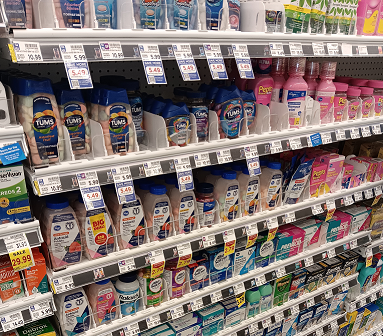
Even if you have a small store with 30-40 products, managing this can be difficult. If you have thousands of products, it gets extremely difficult. If you have multiple store locations, it becomes practically impossible.
When products scan at prices higher than shown on the shelf label, the customer gets angry. If they catch the error before they pay, a store employee will need to locate the product's out-of-date shelf label, and the cashier will do a price override. This is both a waste of time and a loss of revenue.
If your shelf label errors become excessive, your business can get into legal trouble. Here are some examples of how shelf label errors can cause big problems:
The Total Store Solution has a novel system for managing shelf labels. When a product's retail price changes, a shelf label is printed. At this point in time, the product will continue to scan at the old retail price at the cash register. A store employee with a hand-held terminal hangs the new shelf label and then scans the barcode on the label. Once this barcode is scanned, the product will scan at the new retail price at the cash register.
Employees are human, so store employee will make mistakes from time to time. A customer might ask for help while the employee is hanging new shelf labels, and some labels might get misplaced. No problem - these labels will never get scanned by the employee's hand-held terminal, so new labels will be printed to replace them.
Finally, the Total Store Solution includes a shelf label auditing system. An employee walks an aisle and scans the barcode on each shelf label using a hand-held terminal. The system will know immediately if each shelf label is accurate or if it is out of date. If the label is out of date, the hand-held terminal will make a loud "Alarm" sound, and a new, up-to-date shelf label will be printed. Otherwise, the hand-held terminal makes a quick beep, and the employee continues scanning the next shelf label. This goes very quickly - there is no comparing a retail price on the hand-held terminal screen to the price printed on the shelf label. Typically, an employee can scan several dozen shelf labels per minute when doing a shelf label audit.
Take a look at the above picture. Even if you have a single store, this could easily become a big problem. Imagine the situation if you have 10 stores. Or 200 stores! With the Total Store Solution, keeping every product scanning at the correct price is totally achievable.
Product Ordering
The Total Store Solution includes an advanced Product Ordering system. Based on current Inventory Levels and Historical Item Movement statistics, the system recommends an order quantity for each item available from a selected Vendor. The buyer can then override any Order Quantity.
Each item in your store can have a Minimum On-Hand and a Maximum On-Hand.
When creating a Purchase Order, the first step is to Select a Vendor. Then, for each product available from that Vendor, the Item Movement is calculated using a variety of different methods. These include recent sales history, seasonal sales analysis and weighted adjustments. Then, for each item, an Order Quantity is calculated so that, at the end of a specified number of weeks, your approximate in-stock level will be the Minimum On-Hand. Finally, individual item Order Quantities can be adjusted as needed.
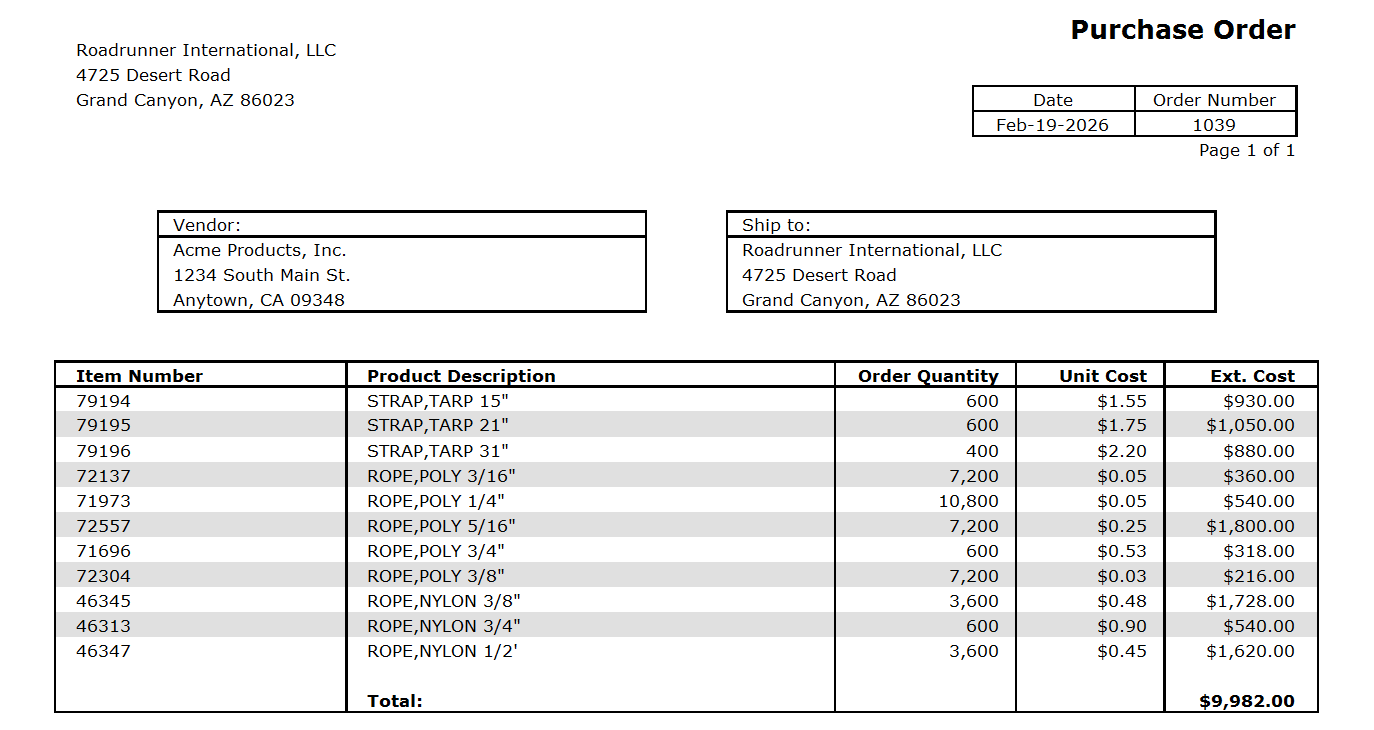
After a Purchase Order is created, it can be printed out or exported to a PDF file. Another option, if your Vendor is able to receive electronic Purchase Orders, the Total Store Solution can export an X12 850 Purchase Order file to send to the vendor. Other electronic Purchase Order file formats are also supported.
Finally, when the Vendor ships the products to your store, you can Receive the Purchase Order using a hand-held terminal. The hand-held terminal will load all the Product Information for each item on the Purchase Order. You can then adjust any Product Cost amounts or Quantity Received counts.
Antique Malls / Consignment Stores
When the Total Store Solution is configured for an Antique Mall or a Consignment Store, the resulting system is truly one-of-a-kind!
Our system has two different modes for handling these types of Stores:
- Mode 1: Every item in the Store is barcoded with a Product Label that displays the Item Description, the Vendor Number and the Item Price. Each Booth Vendor must enter the information for each item, and the system prints Product Labels are printed on a Thermal Printer. The barcodes are scanned at the Cash Register, and checkout is very fast.
- Mode 2: Every item in the Store has a Product Label that is hand-written by the Booth Vendor. Instead of scanning a barcode, the barcode scanner is used to make a digital image of the Product Label. With the Product Label displayed on the touchscreen register, the cashier quickly enters the Vendor Number and the Item Price.
Mode 1 might work for you if your store is brand new. If you have an existing store with a large number of Booth Vendors and many thousands of items for sale, Mode 1 would be nearly impossible to implement. Each Booth Vendor would have to spend a significant amount of time entering all of their item information. Your Booth Vendors would likely depart from your store.
On the other hand, Mode 2 could be put in place with no work required from your Booth Vendors. Also, with digital images archived for all items that are sold, your store would no longer need to remove Product Labels when customers are paying for their purchases. This represents a huge savings of time and effort. Options with Mode 2 include having the cashier enter a product description, enter an item number, or select a product Category for each item purchased.
The Total Store Solution can be configured to calculate consignment fees in a variety of different formats, including different percentages for different price points. Another option is to charge an additional fee for purchases paid with a credit card.
Using an optional Android or iOS App, Booth Vendors can receive notifications when one of their products sells. Also in the App, Booth Vendors can see all of their sales figures.
Finally, the Total Store Solution will print your consignment checks!
Reports
The Total Store Solution creates dozens of different reports including the following:
- Item Movement Reports
- Inventory Reports
- Accounting Reports
- Customer Reports
- Charge Account Reports
- Cash Office Reports
- Customer Invoice Reports
- Customer Account Statement Reports
- Purchasing Reports
- Product Receiving Reports
All of these reports can be customized for the specific needs of the customer. And, if you have an idea for a new report, we will create it for you!
Contact
Please fill in the following form. We would love to talk with you about how the Total Store Solution can work for you.